

Mike Islander
WKR
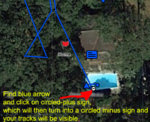
EDIT: Found the answer. I could not find the "User on the map" in order to "Toggle the track visibility icon next to the user on the map". So now I can see tracks on the map. Still only see cumulative or last track on Earthmate app, but I suspect that is "a feature, not a bug". 
Here is what I had to click to make tracks show up:
ORIGINAL MESSAGE
On both the PC and my Samsung tablet browser "EXPLORE" page, I can't see tracks on the map view unless I convert them to routes. I do see them on my Earthmate APP, but they are always combined as one long track or I can choose "Last Track", so only "all" or "last" are my choices. Maybe two issues here, and probably user error, but following the Garmin solutions for this had no effect (visibility icons are clicked on, etc.).
Anyone else had and solved this problem?
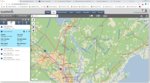
Here is what I had to click to make tracks show up:
ORIGINAL MESSAGE
On both the PC and my Samsung tablet browser "EXPLORE" page, I can't see tracks on the map view unless I convert them to routes. I do see them on my Earthmate APP, but they are always combined as one long track or I can choose "Last Track", so only "all" or "last" are my choices. Maybe two issues here, and probably user error, but following the Garmin solutions for this had no effect (visibility icons are clicked on, etc.).
Anyone else had and solved this problem?
Last edited:


