CPW Draw Stats Excel Conversion

hunthikecamp

Lil-Rokslider
Joined
Mar 7, 2024
Messages
189
Location
Colorado
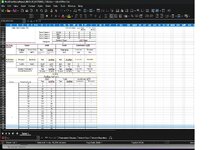
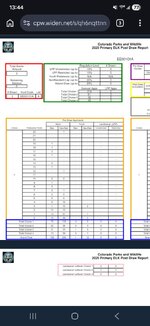
Has anyone had any luck or found any software that will convert CPWs draw reports to excel files? An example of the CPW format im talking about is attached.

I havent found anything that cleanly interprets it yet, AI does a decent job but even it admits it is hard to parse some of the '1' vs '-' cells since its just an image and it makes some pretty basic mistakes in its interpretations.

Ive gotta assume GoHunt and the other big companies do a records request or something of the sort rather than trying to convert this massive pdf, but my bet is that the cost and time for doing it that way is prohibitive for the individual hunter.
 

Attachments

  • Screenshot_20260308_134406_Chrome.jpg
    Screenshot_20260308_134406_Chrome.jpg
    126.6 KB · Views: 19
You can probably make something usable with Power Query in excel. I used it for Wyomings odds. Just need to set it up to manipulate the data into a useable form then feed it the rest of the pages.
 
I use Adobe online for pdf to xls conversions. Some are way better conversions than others, AZG&F is the worst.
Nice, I will give this a try, thanks!

Just contact the department and ask if they can send it to you.
I did try this but didn't have much success, after a while they sent me a file but it was not a usable file, didn't have any meaningful data. I'm not sure what was up with it but I never got resolution on it.
 
Nice, I will give this a try, thanks!


I did try this but didn't have much success, after a while they sent me a file but it was not a usable file, didn't have any meaningful data. I'm not sure what was up with it but I never got resolution on it.

CPW should have a public info request email or form, simply tell them you want the "post draw report" for the species you want, in excel format. Depending on state law, they may or may not provide the data, but will give you an answer as to why if they don't provide it. Because they publicly provide the data in pdf, they may not be required to provide it in excel format.
 
No issue converting Drawn Out requiring only minor clean up
But Draw Recap i think is impossible. Too much data with too many fields per page for Excel to clean it up. Unfortunate as I also would like this data in excell
Yeah and so far most of the important data ive been after is in the Drawn Out, it doesnt tell the full picture but a lot of the Draw Recap data is reading tea leaves anyway when you talk about using it to try and forecast. Ill keep messing around with it and see what i can come up with
 
If all goes well with Claude, I plan to parse the last 5 years of pdfs and database the data. The hardest part is creating the script to grab the data from the pdf correctly. Once that part is ironed out (fingers crossed it can figure it out), it should be cake.
 
Glad to hear im on a similar path to others, ive also been really impressed with Claude's deciphering of it all. I spent a few hours teaching it how the draw works (pref pts and choices) and its not perfect but its come a long way and I can have pretty productive conversations with it rather than just filtering like gohunt. Plus it sucks that GoHunt decided not to keep the list A vs B metadata on all the tags, makes filtering almost useless sometimes
 
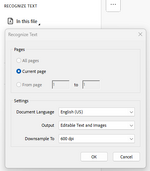
Got some time to play around with this tonight and wanted to update. if you have a paid subscription to Adobe you can use Adobe's built in Optical Character Recognition (OCR) to Recognize Text and Output Editable Text and Images. this doesn't visually do much or change the file but it effectively scans the image for text and recreates the pdf with that text. it looks the same but now it is more readable by computers.

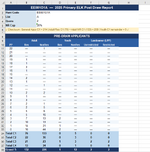
I'll see how this goes with larger files and at volume but I'm thinking input the OCR'ed pdf into Claude and then have Claude spit it back out as an excel file. If you want an excel file...i'll probably skip that last step and just work with the data in Claude but if I wanted an excel file that's one route to go. Still very manual and maybe more roundabout than it needs to be, but solid progress. Here's a snip of the excel that Claude gave me for EE001O1A, spot checked and all #s are accurate, no misreads.
1773119188118.png


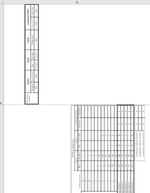
If you take the pdf straight from CPW and use adobe's convert to excel, it's useless and just outputs the tables as images and drops them in the excel file.
1773118440396.png

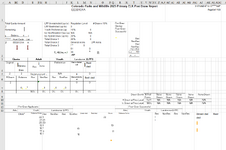
If you use adobe OCR first to convert to editable text and then do adobe convert to xlsx it's a bit neater, but only just barely, and is still a bit of a mess.
1773118498934.png

Where the OCR really moves the needle is that makes it much easier for Claude to parse and the number of errors went to 0, especially when asking it to pull a select few key details.
 

Attachments

  • 1773118635749.png
    1773118635749.png
    19.3 KB · Views: 5
Just a heads up 2025 harvest data was posted earlier today to CPW
It’s a new format.
I like the format itself as it follows Tag Code#.
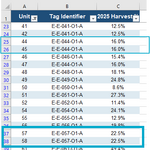
BUT… in the past they would break out data by unit where now if you have a tag that’s a group of 3 or 5 units you only get data as single total vs broken out by unit.
 
So, I was an AI hater for a long time...and still kind of am, for lots of reasons. But I do see a lot of value for this application as I go through this stuff and have been enjoying this.
Not sure if there a way to tie it into my spreadsheets of data for the last 10 years. May just have to start new format file
This is fixable, but it will be the same %age for all GMUs in a tag group since that's how CPW reports it now. What format were you looking for? I tossed the big game brochure and the harvest %age into Claude and it took some back and forth but i eventually got it to output what I assume you're after? See below. PM me if you want and i can send you the excel files, just did the archery tags as an example.

and fwiw any tags i've shown or used in any screenshot are completely random/to show a point, i'm having claude parse all tags and not selecting any in particular as i take screenshots. this is all publicly available info, i'm just manipulating it in AI.
1773294697182.png
 
I can't believe they dont just post this in excel format. Almost guaranteed they are using excel to generate the information in the first place.
 
I can't believe they dont just post this in excel format. Almost guaranteed they are using excel to generate the information in the first place.
You and me both. I'm sure when they started posting this data almost nobody even bothered to look at it so it just didn't matter. but now that people are actually using it maybe they'll eventually catch up to other states and start posting excel data.
 
Back
Top