Once again, Thank You for listening to our issues and doing something about them.When the update hits in the next couple days, I think most of you would be interested in the changing the following settings:
1) Set "Speed Precision" to Integer in settings
2) Set "Solution Display" to Field in settings (can also be changed from the solution screen itself so that you can switch between advanced mode/field mode)
3) Set "Output Precision" to Nearest Dial, or perhaps Tenth
4) Enable "Hide Linear Path/Drift" under Trajectory Table in Settings
5) In your firearm profiles, set your turret graduations = 1. This will disable "clicks" output in the solution screens.
6) You may want to also disable showing data inputs on the trajectory table
In addition to adding the "Field View" solution screen that is similar to v1 with a few improvements (see screenshot above), we've also reverted the trajectory table back to the 'zoomable' variant.
Lastly, the "Hide Linear Path/Drift" setting in the trajectory table would previously replace the linear columns with click-value columns. It now just removes the linear columns, making the table output simpler with just range, angular corrections, velocity, energy and tof.
I am considering @atmat request to disable temp/humidity when using DA. The reason that temp is required is because speed of sound is a function of temperature, and speed of sound is needed for mach to derive the drag coefficients. So assumptions would have to be made on temperature in order to disable that input entirely, and that technically would lead to some inaccuracies. I think overall the error would be small especially at ranges sub-1000. So I'm contemplating it, and just putting in a warning that the trajectory will lose accuracy by enabling it.

Navigation
Install the app
How to install the app on iOS
Follow along with the video below to see how to install our site as a web app on your home screen.
Note: This feature may not be available in some browsers.
More options
Style variation
You are using an out of date browser. It may not display this or other websites correctly.
You should upgrade or use an alternative browser.
You should upgrade or use an alternative browser.
Shooter App v2.0.0
- Thread starter Antares
- Start date

I use DA; I will never use temp or humidity.
I am a beginner so forgive me if this is a stupid question.
I'm basing a lot of this on what form describes about DA in this thread:

Ok everybody, I've put this off long enough. Ready to invest in a Kestrel, but I have no idea what exactly to look for or what is a waste of money as far as features go. I use the Shooter App and Hornady 4DOF for myself as well as some family members, we shoot recreationally here locally in the mountains and have made impacts as far as 1400 yards (thought not first round impacts that far). That said, I've always manually input the info into my ballistic calculator from my weather app and utilized the "weather station" fetch option on my phone in Shooter to get info from the closest weather...
- nobody
- Replies: 156
- Forum: Long Range Hunting
If you're using DA do you typically use a weather meter or something that provides you with that value?
Or are you estimating DA based on the chart and your temperature/ elevation? In that case would it make sense to have those 2 inputs to the app rather than the in-between of a chart?
How critical is the weather meter to that use case out to say 600/700yds? I like that elevation is easy for me to know and temperature I can guesstimate or check with a $10 keychain thermometer rather than needing a kestrel or something to feed me DA? I definitely see the
benefit in DA from a paper dope card backup standpoint.
I've definitely been annoyed with the environment inputs for 4dof and applied ballistics not being very intuitive or convenient for getting close without a weather meter. I've been considering switching to shooter for the simplicity mentioned on this forum.
Edit: I do find it interesting/helpful? that AB shows DA as a calculated value and you can tap it to input that value to override previous environmentals
I use the cheapest Kestrel that gives DA. I check it in the morning, and again later if I remember.I am a beginner so forgive me if this is a stupid question.
I'm basing a lot of this on what form describes about DA in this thread:
Ok everybody, I've put this off long enough. Ready to invest in a Kestrel, but I have no idea what exactly to look for or what is a waste of money as far as features go. I use the Shooter App and Hornady 4DOF for myself as well as some family members, we shoot recreationally here locally in the mountains and have made impacts as far as 1400 yards (thought not first round impacts that far). That said, I've always manually input the info into my ballistic calculator from my weather app and utilized the "weather station" fetch option on my phone in Shooter to get info from the closest weather...
- nobody
- Replies: 156
- Forum: Long Range Hunting
If you're using DA do you typically use a weather meter or something that provides you with that value?
Or are you estimating DA based on the chart and your temperature/ elevation? In that case would it make sense to have those 2 inputs to the app rather than the in-between of a chart?
How critical is the weather meter to that use case out to say 600/700yds? I like that elevation is easy for me to know and temperature I can guesstimate or check with a $10 keychain thermometer rather than needing a kestrel or something to feed me DA? I definitely see the
benefit in DA from a paper dope card backup standpoint.
I've definitely been annoyed with the environment inputs for 4dof and applied ballistics not being very intuitive or convenient for getting close without a weather meter. I've been considering switching to shooter for the simplicity mentioned on this forum.
Edit: I do find it interesting/helpful? that AB shows DA as a calculated value and you can tap it to input that value to override previous environmentals
But it’s minimal unless you’re shooting relatively far. Even on my short slow 223 shooting factory ELDM, when you check the difference between DA at 0 ft and 10k ft, it’s 0.3mil difference at 400 yards, 0.4mil at 500 yards, and 0.7mil at 600 yards.
Cut the DA difference to 5000ft and it’s 0.3mil at 600 yards.
I am not shooting far enough that I could honestly go without a Kestrel in the field.
Edit: by many standards here, I’m a beginner, too.

justin davis
WKR
When the update hits in the next couple days, I think most of you would be interested in the changing the following settings:
1) Set "Speed Precision" to Integer in settings
2) Set "Solution Display" to Field in settings (can also be changed from the solution screen itself so that you can switch between advanced mode/field mode)
3) Set "Output Precision" to Nearest Dial, or perhaps Tenth
4) Enable "Hide Linear Path/Drift" under Trajectory Table in Settings
5) In your firearm profiles, set your turret graduations = 1. This will disable "clicks" output in the solution screens.
6) You may want to also disable showing data inputs on the trajectory table
In addition to adding the "Field View" solution screen that is similar to v1 with a few improvements (see screenshot above), we've also reverted the trajectory table back to the 'zoomable' variant.
Lastly, the "Hide Linear Path/Drift" setting in the trajectory table would previously replace the linear columns with click-value columns. It now just removes the linear columns, making the table output simpler with just range, angular corrections, velocity, energy and tof.
I am considering @atmat request to disable temp/humidity when using DA. The reason that temp is required is because speed of sound is a function of temperature, and speed of sound is needed for mach to derive the drag coefficients. So assumptions would have to be made on temperature in order to disable that input entirely, and that technically would lead to some inaccuracies. I think overall the error would be small especially at ranges sub-1000. So I'm contemplating it, and just putting in a warning that the trajectory will lose accuracy by enabling it.
The first verison when using DA you also would put in a temp but no humidity. I liked that. I use my kestrel and put in DA and the temp.

- Joined
- Oct 22, 2014
- Messages
- 15,270
When the update hits in the next couple days, I think most of you would be interested in the changing the following settings:
1) Set "Speed Precision" to Integer in settings
2) Set "Solution Display" to Field in settings (can also be changed from the solution screen itself so that you can switch between advanced mode/field mode)
3) Set "Output Precision" to Nearest Dial, or perhaps Tenth
4) Enable "Hide Linear Path/Drift" under Trajectory Table in Settings
5) In your firearm profiles, set your turret graduations = 1. This will disable "clicks" output in the solution screens.
6) You may want to also disable showing data inputs on the trajectory table
In addition to adding the "Field View" solution screen that is similar to v1 with a few improvements (see screenshot above), we've also reverted the trajectory table back to the 'zoomable' variant.
Lastly, the "Hide Linear Path/Drift" setting in the trajectory table would previously replace the linear columns with click-value columns. It now just removes the linear columns, making the table output simpler with just range, angular corrections, velocity, energy and tof.
I am considering @atmat request to disable temp/humidity when using DA. The reason that temp is required is because speed of sound is a function of temperature, and speed of sound is needed for mach to derive the drag coefficients. So assumptions would have to be made on temperature in order to disable that input entirely, and that technically would lead to some inaccuracies. I think overall the error would be small especially at ranges sub-1000. So I'm contemplating it, and just putting in a warning that the trajectory will lose accuracy by enabling it.
Your latest update and this- very well done sir.
Please leave in temperature for DA calc for the reasons that you noted.

Strider
Lil-Rokslider
- Joined
- Apr 4, 2018
- Messages
- 214

- Joined
- May 8, 2022
- Messages
- 827
This right here makes me so happy to own and support the Shooter app. Thank you for taking the time to provide real solutions based on feedback rather than just lip service with no fix. Well done sir!When the update hits in the next couple days, I think most of you would be interested in the changing the following settings:
1) Set "Speed Precision" to Integer in settings
2) Set "Solution Display" to Field in settings (can also be changed from the solution screen itself so that you can switch between advanced mode/field mode)
3) Set "Output Precision" to Nearest Dial, or perhaps Tenth
4) Enable "Hide Linear Path/Drift" under Trajectory Table in Settings
5) In your firearm profiles, set your turret graduations = 1. This will disable "clicks" output in the solution screens.
6) You may want to also disable showing data inputs on the trajectory table
In addition to adding the "Field View" solution screen that is similar to v1 with a few improvements (see screenshot above), we've also reverted the trajectory table back to the 'zoomable' variant.
Lastly, the "Hide Linear Path/Drift" setting in the trajectory table would previously replace the linear columns with click-value columns. It now just removes the linear columns, making the table output simpler with just range, angular corrections, velocity, energy and tof.
I am considering @atmat request to disable temp/humidity when using DA. The reason that temp is required is because speed of sound is a function of temperature, and speed of sound is needed for mach to derive the drag coefficients. So assumptions would have to be made on temperature in order to disable that input entirely, and that technically would lead to some inaccuracies. I think overall the error would be small especially at ranges sub-1000. So I'm contemplating it, and just putting in a warning that the trajectory will lose accuracy by enabling it.

- Joined
- Oct 22, 2014
- Messages
- 15,270
Shooter: Once again the best field app on the market.

Wow! This is excellent customer support!
Is there a place where you can set the minimum velocity that turns the text red on the Table? Seems like it would be under Ammo, but I don’t see it. Appears to be defaulting to 1100 fps in this example.
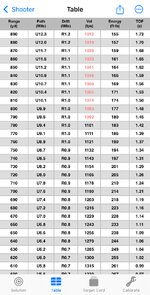
Is there a place where you can set the minimum velocity that turns the text red on the Table? Seems like it would be under Ammo, but I don’t see it. Appears to be defaulting to 1100 fps in this example.
- Joined
- May 8, 2022
- Messages
- 827
I think that currently delineates transonic velocity. Not sure it’s adjustable at this time but agree it would be a nice upgrade, if possible.Wow! This is excellent customer support!
Is there a place where you can set the minimum velocity that turns the text red on the Table? Seems like it would be under Ammo, but I don’t see it. Appears to be defaulting to 1100 fps in this example.
View attachment 1016042
I think that currently delineates transonic velocity. Not sure it’s adjustable at this time but agree it would be a nice upgrade, if possible.
I just thought it was calibrated for TMKs.
Adjustable would be nice.

9487329
Lil-Rokslider
- Joined
- Jan 11, 2025
- Messages
- 206
@kndydevgrp Well done, seriously.
9487329
Lil-Rokslider
- Joined
- Jan 11, 2025
- Messages
- 206
Everyone should go throw up a 5 star review

fwafwow
WKR
- Joined
- Apr 8, 2018
- Messages
- 6,297
I am just this morning seeing this thread and very much appreciate your attitude and the changes. Thank you!5) In your firearm profiles, set your turret graduations = 1. This will disable "clicks" output in the solution screens.
I’m sure this is user error, and probably doesn’t matter (at least for my use), but I am having trouble doing #5. Can you provide further guidance or instructions for a dummy?
Chris in TN
WKR
- Joined
- Jun 17, 2025
- Messages
- 1,933
I don't currently use this app but likely will in the future (regardless of the answer to this question) but would it be possible with MOA outputs to make them settable to round windage to half-moas?
Like, I don't need 1.67 moa any more than mrad users need 1.54 mrads. I'd be fine, possibly even much better off, if it just rounded from 1moa to 1.5moa to 2moa. Even if the scope has 1/4moa clicks, my wind holds don't.
For that matter, for the mil guys, if their scopes have 0.2mrad wind hold marks, they might(?) possibly would just as soon see their wind values rounded to the nearest hold, or nearest 0.2mrad. I can't speak for them but if we're trying to round out meaningless info here....it's a thought.
Like, I don't need 1.67 moa any more than mrad users need 1.54 mrads. I'd be fine, possibly even much better off, if it just rounded from 1moa to 1.5moa to 2moa. Even if the scope has 1/4moa clicks, my wind holds don't.
For that matter, for the mil guys, if their scopes have 0.2mrad wind hold marks, they might(?) possibly would just as soon see their wind values rounded to the nearest hold, or nearest 0.2mrad. I can't speak for them but if we're trying to round out meaningless info here....it's a thought.
You click into the firearm and edit it.I am just this morning seeing this thread and very much appreciate your attitude and the changes. Thank you!
I’m sure this is user error, and probably doesn’t matter (at least for my use), but I am having trouble doing #5. Can you provide further guidance or instructions for a dummy?
However, I don’t see how it’s helpful. It means your solutions round to the nearest whole mil instead of tenth mil. Unless I’m doing it wrong?
I would be fine with this. But for 99% of folks using it for field shooting, is it not irrelevant?Please leave in temperature for DA calc for the reasons that you noted.
Even at a 120* swing, you’re taking 0.1mil at 500 yards.
kndydevgrp
FNG
- Joined
- Feb 2, 2026
- Messages
- 15
You can set your elevation turret graduation and windage turret graduation separately in the firearm. So you could set your windage to 1/2 graduation and then in the Settings set your Output Precision = Nearest Dial.I don't currently use this app but likely will in the future (regardless of the answer to this question) but would it be possible with MOA outputs to make them settable to round windage to half-moas?
Like, I don't need 1.67 moa any more than mrad users need 1.54 mrads. I'd be fine, possibly even much better off, if it just rounded from 1moa to 1.5moa to 2moa. Even if the scope has 1/4moa clicks, my wind holds don't.
For that matter, for the mil guys, if their scopes have 0.2mrad wind hold marks, they might(?) possibly would just as soon see their wind values rounded to the nearest hold, or nearest 0.2mrad. I can't speak for them but if we're trying to round out meaningless info here....it's a thought.
The only caveat is that in the 'clicks' output for your windage, it will show clicks for 1/2 moa (when youre scope's actual turret graduation may not be that). But if you just ignore that, then it's fine.
Chris in TN
WKR
- Joined
- Jun 17, 2025
- Messages
- 1,933
Thank you - that's great to know and exactly what I'd want.You can set your elevation turret graduation and windage turret graduation separately in the firearm. So you could set your windage to 1/2 graduation and then in the Settings set your Output Precision = Nearest Dial.
The only caveat is that in the 'clicks' output for your windage, it will show clicks for 1/2 moa (when youre scope's actual turret graduation may not be that). But if you just ignore that, then it's fine.

To be truly helpful it should take what you input in the gun profile as your rounding. When you build a gun profile, you add your scope turret graduations and angular measurement type. If you added 1/4 MOA it should only give calls in 0.25, 0.50, 0.75, 1.0, etc. Add 1/10 MIL and it should be 0.1, 0.2, 0.3... etc. Giving you the direct response based on your setup and actual turret graduation is the correct way to exhibit the solution.I don't currently use this app but likely will in the future (regardless of the answer to this question) but would it be possible with MOA outputs to make them settable to round windage to half-moas?
Like, I don't need 1.67 moa any more than mrad users need 1.54 mrads. I'd be fine, possibly even much better off, if it just rounded from 1moa to 1.5moa to 2moa. Even if the scope has 1/4moa clicks, my wind holds don't.
For that matter, for the mil guys, if their scopes have 0.2mrad wind hold marks, they might(?) possibly would just as soon see their wind values rounded to the nearest hold, or nearest 0.2mrad. I can't speak for them but if we're trying to round out meaningless info here....it's a thought.
Jay
Similar threads



Featured Video
Latest Articles
- How to Kill Giant Bulls with Ryan Carter
- Kifaru Enters the Hunting Apparel Space: Review
- From Big Bucks to Bear Hunts: Catching Up with Jordan Budd
- Mule Deer Days Wildlife Conservation Mashup
- A Hidden Gem: Hunting Washington with Kari Thomas
- Prime Divide Bow Review
- Knowledge From Storms: Surviving and Thriving in the Backcountry with John Barklow
- DIY Wyoming Pronghorn Hunt
- Unlock Precision Shooting: Master Your Hunting Game with Competitive Insights
- Topo Topper Rincon Review