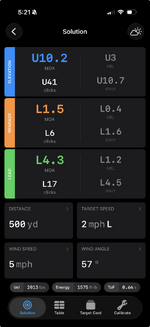
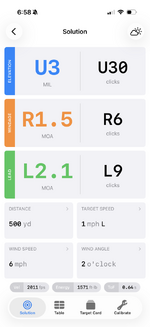
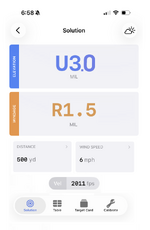
Shooter App v2.0.0

So for input entry, I think what you're saying is that if you tap on the input, you want it to highlight the entire input so you can just start typing the new value and it will replace it. Correct?

Exactly.

I would just like to reiterate how much I appreciate you coming here and soliciting feedback. Thank you again.
 
You can tap on the value at the top right of the slider to enter the value manually and not use the slider at all.

What are you missing for game shots in the view? Energy?

All this “you can tap here” stuff is not intuitive. No one should have to read the directions (at least not more than once) or have the developer explain the app to them. I think there’s an entire Silicon Valley season about that.

Velocity - I need to know the range at which my bullet gets down to 1800 FPS. Below that, many bullets will no longer expand reliably. This is more important to me (and many RokSliders) than energy. That tells me whether I have a 400-yard rifle, 500-yard rifle, etc.

TOF is nice to have, since it tells me how much could go wrong between bang and impact. But not essential.

I don’t mind energy being there, but I don’t need it. I suspect that many of your users like knowing this number, even though it is useless to me.

I appreciate your willingness to listen to feedback.

Edit - if you have the ability for the user to customize the order of the columns, that would also be handy. Or even to disable some columns completely, that would be useful.

 
All this “you can tap here” stuff is not intuitive. No one should have to read the directions (at least not more than once) or have the developer explain the app to them. I think there’s an entire Silicon Valley season about that.

Velocity - I need to know the range at which my bullet gets down to 1800 FPS. Below that, many bullets will no longer expand reliably. This is more important to me (and many RokSliders) than energy. That tells me whether I have a 400-yard rifle, 500-yard rifle, etc.

TOF is nice to have, since it tells me how much could go wrong between bang and impact. But not essential.

I don’t mind energy being there, but I don’t need it. I suspect that many of your users like knowing this number, even though it is useless to me.

I appreciate your willingness to listen to feedback.

Edit - if you have the ability for the user to customize the order of the columns, that would also be handy. Or even to disable some columns completely, that would be useful.
I’ll second this with one amendment: it would be nice for a particular gun/bullet combo to list a minimum bullet fps and have that range highlighted in the table.

For instance: 6XC / 107 TMK - 1600 fps minimum

6XC / 105 Berger Hybrid- 2100 fps minimum

I don’t care about energy. It would be nice to be able select what is presented in solution table and in what order.
 
Developer of Shooter here.

Sorry to hear you and others here are disappointed with the update. Let's talk about it and perhaps we can release an update that addresses some/all of your issues.

Default Calc Display indeed does not function, this is a known bug after updating and will be resolved.

New app does use 2 decimals of precision now. If this is a big heartache, we can add a Setting for the output precision.

You are correct that we removed simple/advanced and it now just has all features enabled all the time.

What about the solution screen is vomit-inducing?

Can you elaborate / clarify on input entry problems? From what screen are you having to manually delete the old entry and enter new ones?
Would it be possible for you to provide a link to revert to the previous version, it was so good that nothing else came close for hunting usage please
 
Screenshot 2026-02-02 at 5.21.51 PM.png


What if there was a Setting to enable a Simple solution display mode that looked like the above? Does this capture what the consensus here wants to see? It's really quite similar to v1 in overall structure and capability.
 
It should be 4.1 mil instead of 41 clicks, since that's what you'll read on the scope; rounded to the nearest tenth, also like you'd see on the scope

You don't count out 41 clicks, you dial to 4.1
 
View attachment 1015282


What if there was a Setting to enable a Simple solution display mode that looked like the above? Does this capture what the consensus here wants to see? It's really quite similar to v1 in overall structure and capability.
Just wanna say thanks for being opened minded about this. I get you can please some of the people all the time, all the people some of the time but never all the people all the time. The fact you’re actively tying is pretty damn awesome.
 
It should be 4.1 mil instead of 41 clicks, since that's what you'll read on the scope; rounded to the nearest tenth, also like you'd see on the scope

You don't count out 41 clicks, you dial to 4.1
Oh I didn't see that it was both Mils and MOA. It should definitely only show whichever unit you chose and not both.
 
View attachment 1015282


What if there was a Setting to enable a Simple solution display mode that looked like the above? Does this capture what the consensus here wants to see? It's really quite similar to v1 in overall structure and capability.

I think a Simple mode would be nice. I would remove Lead from everything, most people are not accurate in calling the wind let alone what an animal is doing for speed.
As others have said thanks for coming in and listening to us.
 
It should be 4.1 mil instead of 41 clicks, since that's what you'll read on the scope; rounded to the nearest tenth, also like you'd see on the scope

You don't count out 41 clicks, you dial to 4.1
The angular corrections on the left side of the cards are in whatever your firearm's elevation unit is set to in the profile. In the screenshot, my firearm is MOA so its showing click count for MOA. You're referring to MIL, in particular 1/10th graduation mrad/mil. If you had chosen mil and 1/10th in the firearm profile, then it would say U3 MIL or 30clicks.

Some people don't use the click values, I get it. However, its used quiet commonly when a shooter's assistant is calling out corrections (i.e. windage left 8 clicks) and it allows the shooter to not think at all and just click the turret that many times.

The cards also show angular corrections in the other 2 angular units that your firearm profile is not. So if your firearm is MOA, the other 2 will be MIL and IPHY. This is how v1 was as well. This was mostly for when your scope's turrets may be in a different angular unit than your reticle hashes.
 
One thing I learned while working on a consumer hardware/app connected product that spanned generic users and hyper-nerds was that the best way to handle both is to default everything to the bare bones essentials, with more niche or complex modes (many that are often requested by people who just want to tinker with things that don't matter) unlocked in the settings.

The people who want no frills and simple don't want to mess with all of the settings, and the folks who want all of the variables under the sun are the same users who are willing to spend some time messing with the settings to get it exactly how they want it.
 
Back
Top