How to get proper scale for Archers Advantage sight tape print?

philcox

WKR
Shoot2HuntU
Joined
Nov 27, 2018
Messages
1,227
Location
Auburn, CA
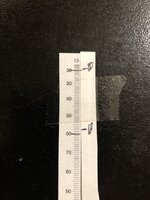
Curious as to how folks have calibrated their printers. The sight tapes are too big when I print at 100%. For example, for my Fast Eddie the tape I used when doing the two calculations 20 and 60, because that’s as far as I had, when I print it out and line it up against that reference tape, the printed tape 60 is more like where actual 70 is. Thus I would be shooting way high. I assume it’s some type of scaling on my printer that is the issue. Any pointers are appreciated.
 
I haven't had issues with scaling. Just print at 100% and cut out.


I'm thinking you might have something wrong in your inputs that is creating an inaccurate tape.


How did you calculate the tape?
 
I haven't had issues with scaling. Just print at 100% and cut out.


I'm thinking you might have something wrong in your inputs that is creating an inaccurate tape.


How did you calculate the tape?
Put a tape on the site, Mark my 20 yard spot then backed up to 50, and Marked that. Use the caliper to measure the distance between the two Mark with that tape laid flat on the table, came out to 1.045 I believe. And put those two numbers and use to “calculate speed”. I’m using the online version. He calculated at 275, and my Caldwell chronograph that I have put me at roughly 275 to 278, so it didn’t seem totally out of line.
I think I’m following the instructions as best I can, but if you have any hints I’d appreciate it.
 
I wish the program would print like a 1 inch scale on the sheet as well. Then I could use a caliper to find out if the 1 inch scale is exactly what it should be.
 
Put a tape on the site, Mark my 20 yard spot then backed up to 50, and Marked that. Use the caliper to measure the distance between the two Mark with that tape laid flat on the table, came out to 1.045 I believe. And put those two numbers and use to “calculate speed”. I’m using the online version. He calculated at 275, and my Caldwell chronograph that I have put me at roughly 275 to 278, so it didn’t seem totally out of line.
I think I’m following the instructions as best I can, but if you have any hints I’d appreciate it.


I'm assuming you measured your peep height and the distance between peep and sight correct?


I also frequently need to go back and double check what I have put in as sometimes it changes.

I generally use 20-80 and I haven't had problems, I'm no whiz with computer stuff either. It's always a miracle that I get the thing to print, but once I get to that point I haven't had issues.
 
I don't have a horizontal 80 to sight to, 60 was the longest.

Here is what I have in my settings:
  • Setup
    • Bow: 70# max, 6.5 BH, DL 28.5, Current Arrow 275 (based on calc speed)
    • Sight: Fast Eddie, Peep to Sight 28", Peep Height 3.25 (was 3.332 actual)
    • Arrow: Calculated weight 443 (consistent with my scale), 28.75" length
  • Sight In
    • Range 1: 20, Mark 1: 0, Range 2: 60, Mark 2: 1.045 (Caliper when tape flat on table)
  • Tape Layout
    • Top to Bottom; Number Range 10, 20, 30; Medium Line width; Arial, Small Font, 1yd increments, Left Justify, Light Line Weight
I have attached my sight-in tape, and the printed sight tape. The 20's are aligned, my pen mark (for highlight) is a bit off.
 

Attachments

  • Image.jpeg
    Image.jpeg
    239.4 KB · Views: 50
Other than double checking your measurements, I don't know. Check that your calculated speed is what is actually entered in your setup before you print.

You could just change your speed until you get it to line up. Probably something like 282 or so.
 
Did you measure your draw length on a draw board or go off cams/mods. Same with draw weight. Those will make a big difference
 
I’m not sure if something has changed on AA but recently their FPS estimates and site tapes have been fairly off for me. I use it as a starting point but often have to use the ones on either side of the ‘correct’ tape.

I also now find what marks on the wheel each yardage matches to in 10 yard increments so I can see how the site tapes match up. I have a Spot Hog Hog Father


Sent from my iPhone using Tapatalk
 
I’m not sure if something has changed on AA but recently their FPS estimates and site tapes have been fairly off for me. I use it as a starting point but often have to use the ones on either side of the ‘correct’ tape.

I also now find what marks on the wheel each yardage matches to in 10 yard increments so I can see how the site tapes match up. I have a Spot Hog Hog Father


Sent from my iPhone using Tapatalk

Do you use the marks on the wheel when setting your tape? I find that to be the easiest way.

Do a 20 yard sight in, the go to 60 or 80. You can use the numbers on the wheel and rotation knob to get your marks. Of course you need to spin the knob the whole way, doesn't work if you unclick and rotate.


My last tape turned out a fps that was .3 off of my 3 arrow average.
 
Yup I use the marks. I used to just do 20 and either 60 or 80 but when I have time I also write down 30, 40, 50 etc and then when I put the AA site tape on I can see how well or poorly it’s lining up. Helps me get to the right tape faster.


Sent from my iPhone using Tapatalk
 
This whole thing is more than confusing. I THINK I have the tape that works, but says my 341fps IBO 70# Nexus 2 28.5 DL shooting a 487g arrow is shooting at 245 fps (I don't think so), the same corresponding Black Gold tape says 271.5 (which seems much more realistic). I am going to just forget about trying to get AA to give me anything useful, and just print sight tapes that work. I had high hopes, but the tool just is not working correctly.
 
This whole thing is more than confusing. I THINK I have the tape that works, but says my 341fps IBO 70# Nexus 2 28.5 DL shooting a 487g arrow is shooting at 245 fps (I don't think so), the same corresponding Black Gold tape says 271.5 (which seems much more realistic). I am going to just forget about trying to get AA to give me anything useful, and just print sight tapes that work. I had high hopes, but the tool just is not working correctly.

Yeah mine is similar. What it says my FPS is waaaay off from every chronograph I use. I just ignore the FPS. That discrepancy is also why I feel like something changed because it used to be fairly but not super accurate at estimating FPS.

But the tapes it prints are still good just take some playing with. At least for me.


Sent from my iPhone using Tapatalk
 
Yeah mine is similar. What it says my FPS is waaaay off from every chronograph I use. I just ignore the FPS. That discrepancy is also why I feel like something changed because it used to be fairly but not super accurate at estimating FPS.

But the tapes it prints are still good just take some playing with. At least for me.


Sent from my iPhone using Tapatalk
Yep, the other thing I hope works for a starter set is the uphill/downhill estimates. Give me something to do some practicing with.
 
I really haven't had trouble with it, and I'm technology challenged.

Spent years making my own tapes, been really impressed with the AA tapes, way more accurate than any of the supplied tapes I had used before.


Not saying it's not off, just read thru the help stuff, make sure you're entering data correctly.
 
Put a tape on the site, Mark my 20 yard spot then backed up to 50, and Marked that. Use the caliper to measure the distance between the two Mark with that tape laid flat on the table, came out to 1.045 I believe. And put those two numbers and use to “calculate speed”. I’m using the online version. He calculated at 275, and my Caldwell chronograph that I have put me at roughly 275 to 278, so it didn’t seem totally out of line.
I think I’m following the instructions as best I can, but if you have any hints I’d appreciate it.
Ok here is a little cheat I’ll share with you to get a decent tape with AA based on your speed. This only works if all of your other measurements are correct and you enter them correctly.
When you go to enter your marks set the first distance to 10 yards and set the mark to 10 also. For your longer distance set that to 100 yards. Next you will adjust your mark for 100 yards until the calculated speed matches your average chronograph speed. This is the best way to make a tape for a Spot Hogg based off of speed that I’ve done. From there you can then make slight adjustments to get it perfect.
 
Back
Top