kylem
Lil-Rokslider
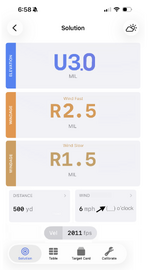
This is what I would want but with the wind direction speed and distance big and bold as well. The simpler the better. That would be all I need in the heat of the moment to make a shot on an animal.

Follow along with the video below to see how to install our site as a web app on your home screen.
Note: This feature may not be available in some browsers.
This is what I would want but with the wind direction speed and distance big and bold as well. The simpler the better. That would be all I need in the heat of the moment to make a shot on an animal.
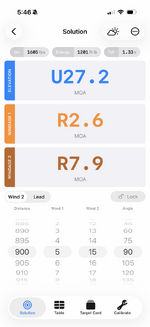
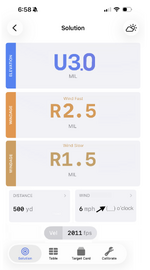
I agree, BUT I think you need wind direction. I’d rather keep the four bottom displays and three top displays, on the bottom would be distance, wind angle, wind-1, and wind-2. Up top would be the elevation solution first, then in green wind-1, then below that in red wind-2. That allows me to plug in a low and a high wind and able to estimate between and around those allowing for quicker wind calls in gusty conditions. Hundred percent agree I don’t need a target speed for my use. It might be really hard to implement, but a setting to allow choosing which outputs showed up on that screen would be ideal.

I agree, BUT I think you need wind direction. I’d rather keep the four bottom displays and three top displays, on the bottom would be distance, wind angle, wind-1, and wind-2. Up top would be the elevation solution first, then in green wind-1, then below that in red wind-2. That allows me to plug in a low and a high wind and able to estimate between and around those allowing for quicker wind calls in gusty conditions. Hundred percent agree I don’t need a target speed for my use. It might be really hard to implement, but a setting to allow choosing which outputs showed up on that screen would be ideal.
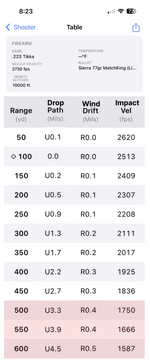
But mostly I just use a simple range card with distance, elevation in mils, wind-1, wind-2 both in mils, and velocity. Ideally, I’d want to pick the distance increments, the order of the columns at a minimum, and ideally delete columns I don’t want to see.
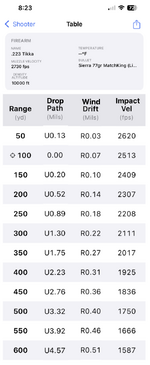
Edit - if you have the ability for the user to customize the order of the columns, that would also be handy. Or even to disable some columns completely, that would be useful.
Must be an iPhone thing? My android phone Shooter App was last updated in July of 2025 with a note of "making it compatible for future android systems".Holy hell. I went to the range today, popped open Shooter, and did a double take. Looks like they pushed update v2.0.0 yesterday (Jan 30, 2026) and… it’s different.
I have all kinds of questions. My initial reaction is that it’s a step in the wrong direction, to be polite. Anyone else see this?
Editing now that I’ve looked at it in more detail.
- Default Calc Display option in settings doesn’t seem to work. Mine shows the Solution screen no matter what.
- It displays mils to two decimals in the Table screen. I want it rounded to one decimal.
- There doesn’t seem to be a Simple/Advanced setting anymore.
- The Solution screen makes me want to barf.
- Velocity calibration seems unchanged, which is good. It was good before.
- When entering inputs (e.g., distance, temp, etc), you have to manually delete the old entry and enter the new one. It should let you simply overwrite the old entry without needing to manually delete it.
View attachment 1015434
ok last one, I swear. ignore the numbers, they aren't real
damn, forgot the 10ths.This basard beat me to it. This is what I want
Bastard beat me to it. This is so close. Round to 10ths. Love the zero crosshair on the left for zero range.
Hot take: I hate L/R and U/D for adjustments. +/- is plenty, if that.
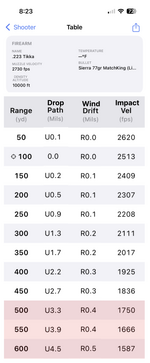

That's nice! Adding the min impact velocity highlight is probably too much to ask the developer right now, because then you'll need the option to turn it on/off, develop a library value and add a manual override/entry.View attachment 1015460
red shows under target impact velocity
(moa fudds could also have red highlighted below targeted energy too I guess)
Must be an iPhone thing? My android phone Shooter App was last updated in June of 2025 with a note of "making it compatible for future android systems".
Jay

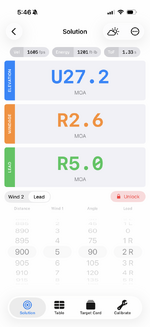
I was planning to add a second wind speed in the next release. However, I wasn't planning on putting it on a 'simple' solution screen. But if you all feel like you DO NOT want lead and instead just want a second wind, then I could accommodate that on the simple solution.