Shooter App v2.0.0

Holy hell. I went to the range today, popped open Shooter, and did a double take. Looks like they pushed update v2.0.0 yesterday (Jan 30, 2026) and… it’s different.

I have all kinds of questions. My initial reaction is that it’s a step in the wrong direction, to be polite. Anyone else see this?

Editing now that I’ve looked at it in more detail.

- Default Calc Display option in settings doesn’t seem to work. Mine shows the Solution screen no matter what.

- It displays mils to two decimals in the Table screen. I want it rounded to one decimal.

- There doesn’t seem to be a Simple/Advanced setting anymore.

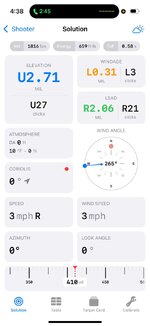
- The Solution screen makes me want to barf.

- Velocity calibration seems unchanged, which is good. It was good before.

- When entering inputs (e.g., distance, temp, etc), you have to manually delete the old entry and enter the new one. It should let you simply overwrite the old entry without needing to manually delete it.
Developer of Shooter here.

Sorry to hear you and others here are disappointed with the update. Let's talk about it and perhaps we can release an update that addresses some/all of your issues.

Default Calc Display indeed does not function, this is a known bug after updating and will be resolved.

New app does use 2 decimals of precision now. If this is a big heartache, we can add a Setting for the output precision.

You are correct that we removed simple/advanced and it now just has all features enabled all the time.

What about the solution screen is vomit-inducing?

Can you elaborate / clarify on input entry problems? From what screen are you having to manually delete the old entry and enter new ones?
 
Developer of Shooter here.

Sorry to hear you and others here are disappointed with the update. Let's talk about it and perhaps we can release an update that addresses some/all of your issues.

Default Calc Display indeed does not function, this is a known bug after updating and will be resolved.

New app does use 2 decimals of precision now. If this is a big heartache, we can add a Setting for the output precision.

You are correct that we removed simple/advanced and it now just has all features enabled all the time.

What about the solution screen is vomit-inducing?

Can you elaborate / clarify on input entry problems? From what screen are you having to manually delete the old entry and enter new ones?
@Formidilosus is the ONLY reply we need. Like he said 100 different answers will accomplish nothing
 
Developer of Shooter here.

Sorry to hear you and others here are disappointed with the update. Let's talk about it and perhaps we can release an update that addresses some/all of your issues.

Default Calc Display indeed does not function, this is a known bug after updating and will be resolved.

New app does use 2 decimals of precision now. If this is a big heartache, we can add a Setting for the output precision.

You are correct that we removed simple/advanced and it now just has all features enabled all the time.

What about the solution screen is vomit-inducing?

Can you elaborate / clarify on input entry problems? From what screen are you having to manually delete the old entry and enter new ones?
New interface is taking time to find out everything’s place. With that said, how can I get a table with out inches and lead etc. I just want mils elevation and wind, and velocity?

Oh and DA only goes to -1000.
 
Developer of Shooter here.

Sorry to hear you and others here are disappointed with the update. Let's talk about it and perhaps we can release an update that addresses some/all of your issues.

Default Calc Display indeed does not function, this is a known bug after updating and will be resolved.

New app does use 2 decimals of precision now. If this is a big heartache, we can add a Setting for the output precision.

You are correct that we removed simple/advanced and it now just has all features enabled all the time.

What about the solution screen is vomit-inducing?

Can you elaborate / clarify on input entry problems? From what screen are you having to manually delete the old entry and enter new ones?

Really appreciate you jumping in here. Thanks! I agree that @Formidilosus is the best person to speak on this, but since some of these complaints are mine, I will address them.

- Yes, I think a setting for Output Precision is needed. I want a solution I can dial (2.9 MIL) not something I need to round/waste mental energy on (e..g, 2.86 MIL).

- Input entry problem: If the field is blank, then it works fine, but if the field already has a value in it, when you go to enter a new value it just adds more digits to the existing number instead of overwriting. Example, Distance is set at 600 yards, I want to change it to 1000... I tap the field, it puts the cursor in somewhere, I start to type "1" and I get either 1600 or 6001, depending on where the cursor landed, now I have to delete everything and start over. Yes I could change that by using the slider on the Solution page, but that begs the question, if you can change all inputs from the Solution page, what's the point of the first page? Just selecting rifle and ammo?

- The Solution page is way, way too busy. Coriolis, azimuth, lead, speed, atmospherics, energy, ToF... all that can go away. The "solution" is elevation and wind, full stop. Everything else is a distraction. You can disregard my thoughts on this because once the Default Calc Display is fixed, I'll look at Table exclusively and never look at Solution again.

Again, really appreciate your willingness to hear us out. Shooter is my go to ballistic app and I've used several.
 
Developer of Shooter here.

Sorry to hear you and others here are disappointed with the update. Let's talk about it and perhaps we can release an update that addresses some/all of your issues.

Default Calc Display indeed does not function, this is a known bug after updating and will be resolved.

New app does use 2 decimals of precision now. If this is a big heartache, we can add a Setting for the output precision.

You are correct that we removed simple/advanced and it now just has all features enabled all the time.

What about the solution screen is vomit-inducing?

Can you elaborate / clarify on input entry problems? From what screen are you having to manually delete the old entry and enter new ones?


The first thing is to realize that unlike other places, Shooter was being used here to kill animals. And in a large part, a certain way. The old Shooter was preferred because of its simple, clean layout, and a good table view. All other apps try to be fancy and cute with all the options that do not matter, and in the end become convoluted, complicated, and useless.


Screenshot 2026-02-01 at 4.38.02 PM.jpeg

Let’s start with elevation and windage output:
Why do you have an output that can’t be dialed out? 7.67 mils can’t be dialed out or held- it is either 7.6 or 7.7 mils. Adding the second decimal is utterly useless, complicates the view, and creates a thing where someone has to read all the way across, decide to round up or down, and then apply it. Windage of course is the same.


Atmosphere. Why does it bottom out at -1,000 DA? I was shooting in -3,000ft DA two days ago while trying to kill animals.


Coriolis

If I don’t have coriolis selected, why is it in the solution page? How many people actually need to account for coriolis?

Wind Angle:

Now it is very easy to accidentally slide your finger over it and change the angle accidentally. Again, field shooting, not PRS here (happened on an animal).


Speed (lead):

One it’s not labeled what it is, so confusion follows. Second, why is there a decimal place? No one can judge a target moving to a decimal mph. The speed slider bar may seem neat on the surface, but in the cold, under time/mental stress it is finicky and hard to stop exactly where you want it. It is fluff, with no real use or reason.


Wind speed adjustment:

Like the lead speed- wind speed slider bar may seem neat on the surface, but in the cold, under time/mental stress it is finicky and hard to stop exactly where you want it. Beyond that, why is there a decimal place? No one, no where can call wind to a decimal. 7.4 mph versus 7.6 mph is not a thing. So again- complicated, fussy, slow, rife for a mistake (happened on an animal).

Azimuth and look angle:

These are on the main page- why do I need them on the solution page?


Range slider bar:

Like the speed and wind speed bars- fussy, finicky, hard to get the range to be what you want, and is easily accidentally adjusted (happened on an animal).


Table view:

Why is the table view where you can slide left and right? All this does is add a chance for a finger, glove, or anything else to accidentally slide the table over, and then when you look for drop data next to range, you are actually reading drift in inches say (happened on an animal).
You also cannot now pinch the screen to shrink the table down, so you can use it as a Lock Screen like so-
IMG_3640.jpeg


Overall, 2.0 took a very clean and simple user interface, that was the best on the market in actual use, and made it complicated, gadgety, finicky; just like every other app on the available.


Saturday morning I opened my app up with three other shooters preparing to start culling deer. When this updated version opened, I couldn’t believe it. The whole day trying to kill as many see as possible me for those three shooters, the app itself cost 4-5 deer with the issues above, and overall because of the complicated and poor user interface, cost between 8-10 deer in one day. Just the general complicated layout is a disaster.
None of this may matter for a person sitting at a bench untimed, or for PRS shooters with all day to set their range cards up, but it is awful for killing living, moving, dynamic targets, rife with a whole bunch of traps that can accidentally be done that are not easy to catch.


In short- at a minimum, offer back version 1.0. Alternatively, I’m willing to buy version 1 from you.

 
Form nailed it as far as I am concerned. I’ll repeat that all relevant columns in the table view have to be visible on an iPhone screen. No scrolling left or right. The old version told me exactly what I needed to know, and nothing more, whether I was hunting or at the range.
 
Developer of Shooter here.

Sorry to hear you and others here are disappointed with the update. Let's talk about it and perhaps we can release an update that addresses some/all of your issues.

Default Calc Display indeed does not function, this is a known bug after updating and will be resolved.

New app does use 2 decimals of precision now. If this is a big heartache, we can add a Setting for the output precision.

You are correct that we removed simple/advanced and it now just has all features enabled all the time.

What about the solution screen is vomit-inducing?

Can you elaborate / clarify on input entry problems? From what screen are you having to manually delete the old entry and enter new ones?

Very impressed that you’ve come here to get input. This is a whole other level of customer service, especially in today’s world. Thank you!
 
Really appreciate you jumping in here. Thanks! I agree that @Formidilosus is the best person to speak on this, but since some of these complaints are mine, I will address them.

- Yes, I think a setting for Output Precision is needed. I want a solution I can dial (2.9 MIL) not something I need to round/waste mental energy on (e..g, 2.86 MIL).

- Input entry problem: If the field is blank, then it works fine, but if the field already has a value in it, when you go to enter a new value it just adds more digits to the existing number instead of overwriting. Example, Distance is set at 600 yards, I want to change it to 1000... I tap the field, it puts the cursor in somewhere, I start to type "1" and I get either 1600 or 6001, depending on where the cursor landed, now I have to delete everything and start over. Yes I could change that by using the slider on the Solution page, but that begs the question, if you can change all inputs from the Solution page, what's the point of the first page? Just selecting rifle and ammo?

- The Solution page is way, way too busy. Coriolis, azimuth, lead, speed, atmospherics, energy, ToF... all that can go away. The "solution" is elevation and wind, full stop. Everything else is a distraction. You can disregard my thoughts on this because once the Default Calc Display is fixed, I'll look at Table exclusively and never look at Solution again.

Again, really appreciate your willingness to hear us out. Shooter is my go to ballistic app and I've used several.
Thanks for the additional information. We'll add an Output Precision to control the decimal output.

So for input entry, I think what you're saying is that if you tap on the input, you want it to highlight the entire input so you can just start typing the new value and it will replace it. Correct?

I hear you on the Solution being busy -- it does have a lot more now. I totally agree the primary purpose is to provide you with the shot solution -- that's why the shot solutions are colored and bigger than everything else on screen. However, with just a couple solutions shown, there would be a ton of unused space. When you have phone with a large display, we're just trying to take advantage of the real estate and allow you to 1) change the inputs easily (especially highly variable things like wind speed/direction) and 2) verify what the inputs are when you're reading the shot solution. Since we have space to do that, why not do it?

You are right that with this change, the main screen is less needed and honestly, I toyed around with removing it entirely and have the app launch into the calculation tab view. The problem is, people don't like change (obviously :P) and doing that would make the app feel 100% different instead of 40-50% different. This new update keeps the overall nav/structure familiar.

Open to thoughts here.
 
Form nailed it as far as I am concerned. I’ll repeat that all relevant columns in the table view have to be visible on an iPhone screen. No scrolling left or right. The old version told me exactly what I needed to know, and nothing more, whether I was hunting or at the range.
We have received a lot of complaints over the years that the table view did not have a fixed header and range column (so that when you scroll, the table headings and range stay fixed). This update addresses that. You may have to scroll over to see Velocity, Energy and ToF (unless you have a very small phone or very large ), but everything else should be viewable. Can you tell me whats getting cut off now that you're interested in seeing? Is it those 3 things, or something else given your device/configuration?
 
We have received a lot of complaints over the years that the table view did not have a fixed header and range column (so that when you scroll, the table headings and range stay fixed). This update addresses that. You may have to scroll over to see Velocity, Energy and ToF (unless you have a very small phone or very large ), but everything else should be viewable. Can you tell me whats getting cut off now that you're interested in seeing? Is it those 3 things, or something else given your device/configuration?

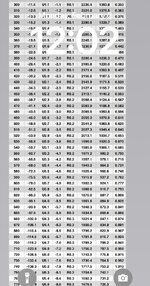
Here is a screenshot taken with the new app:
382e7e0e22aaaa50d3c885792d78b9c1.jpg

Here is a screenshot taken with the old version.
d021e2bef6868fe3d143a95339f37a40.jpg


Notice that I would have to scroll over to see all the same information that was normally on one screen? And that appears to be in large part because you have added another [unnecessary] significant digit.

You also added a column for “Lead”, which is pointless from my perspective. I can only speak for myself, but I don’t need to calculate how much to lead a deer moving 25 mph at 700 yards. That’s not a shot anyone should be taking on a game animal. But, if someone does need to know how much to lead a deer at that range, they don’t need it displayed in hundreds of inches down to the hundredth of an inch. 36.7 feet will be close enough.

What I need to know, most of all, once I know the drop, is my bullet’s velocity at that range, so I can have some idea how my bullet will perform.

PS - I never even looked at “Solution” in the old version and I was happy with just a clean, useable graph.
 
We have received a lot of complaints over the years
this might be a great opportunity to potentially do one of two things:

1. Create two versions of the app: one for the masses that adds all of the features that people complain and ask for, and one based off of feedback from @Formidilosus, making an even more optimized version than v1. I would be very interested in paying good money for that version.
"Shooter advanced" and "shooter hunt"

2. Allowing all deselected items to disappear, and allowing all precision to be determined in settings. This could also have a "form mode" or "RSS mode" toggle in the settings that automatically selects all of the precision and fields to a specific combination

It's definitely worrying that settings are editable in the "solutions side" so easily. Should be a toggle to turn on editing as to not open the door for accidental changes
 
Back
Top