Measuring distance traveled question

gostovp

WKR
Joined
Mar 18, 2022
Messages
907
When someone says they put on 6, 7, 8 miles or whatever in a day, how are they measuring that? I’m assuming this distance is 3D distance and not as the crow flies distance, correct? Does a track on OnX measure 3D distance or “as the crow flies” distance? (I’m a flatlander so my OnX tracks don’t have much elevation change). Or are people using step counters on smart watches or something?
 
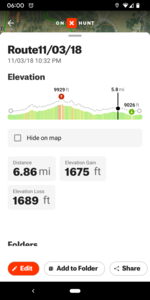
I only track distance using my GPS unit. I tried using OnX but found that it was inconsistent. It seemed like when I turned the screen off and put it in my pocket the tracking stopped. It eats battery quite a bit too so the GPS unit works far better. The InReach Mini2 is supposed to do a good job as well. To my knowledge the GPS unit (and OnX) will give you "true" distance (i.e. including elevation gain/loss). When I look at my tracks it tells me what the elevation gain/loss was so I assume it rolls that into the total distance of the track.
 
I generally don't track my distances, but have a pretty good idea just from experience. And I always assume that my GPS is showing me straight line distances when I'm checking to see how far the truck or camp is. Looking at maps it's easy to see straight line distances, but that doesn't account for elevation changes......or zigzagging. I normally don't turn my GPS on until I want to check something out.......or heading back to the truck or camp. And then it's generally shortest distance between two points for hiking out for me.
 
Some Garmin's can do 3d distance, but not all. You'll want to fiddle with your device settings to find out. I don't usually run tracking, I'll just drop some lines on the rough contours I followed if I want a mileage estimate.

I use my onX to plan a route then everyone and a while compare my sight navigating to my intended route. Works well and gets me where I want to go.
 
Most people are just lying.... I'm kidding-ish.
I use the track log feature on whichever app I'm using. OnX, Avenza, GPS. They all work basically the same. Pro Tip for you: Put your phone on airplane mode when doing a track log to save you some battery power.
 
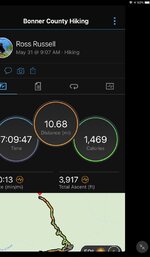
I always run the tracker on onX when I’m in the woods. I like to see the areas I’ve been thru and know the distances and times to get here and there. I have seen some small inconsistencies in mileage, like a trail we did the other day showed 4 miles in, but 3.6 out, my wife’s onX showed 3.8. I’ve also noticed some phones, like a buddies Samsung shows a lot more moving around of the track when not moving.
 
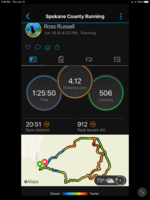
Used to guess decades ago now between Gaia and garmin instinct watch I get very good accuracy for everything i need and the map feature on the watch when I get home is very nice…..
 

Attachments

  • DE9D2309-2E0F-4155-A1EC-7429452F7D0B.png
    DE9D2309-2E0F-4155-A1EC-7429452F7D0B.png
    401.2 KB · Views: 51
  • 3049FEEC-DC4D-415D-82B2-471CCC69C6CE.png
    3049FEEC-DC4D-415D-82B2-471CCC69C6CE.png
    1.1 MB · Views: 47
Last edited:
Used to guess decades ago now between Gaia and garmin instinct watch I get very good accuracy for everything i need and the map feature on the watch when I get home is very nice…..
I have a Garmin instinct as well. How do you configure it so that it will track you all day and not run out of battery? What map feature on the watch are you referring to?
 
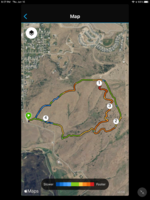
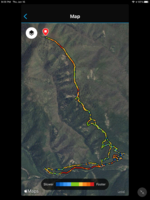
Within garmin connect you can bring up a map option once your info is loaded…..battery life on non solar unit I can only get 9 hrs running time so if want more the solar option may solve this….aerial images on garmin connect
 

Attachments

  • 45EFBE08-D757-416D-841C-695C74273CCB.png
    45EFBE08-D757-416D-841C-695C74273CCB.png
    1.7 MB · Views: 36
  • 3111675B-02BE-4BA4-9C49-B35B959AC1F7.png
    3111675B-02BE-4BA4-9C49-B35B959AC1F7.png
    1.9 MB · Views: 36
  • 65DC86FB-E14E-4917-ABB6-17804E5A5499.jpeg
    65DC86FB-E14E-4917-ABB6-17804E5A5499.jpeg
    84.2 KB · Views: 34
I used a mix of gps, dead reconning, and map SWAG for years. Now that I have a Fenix 7X I will actually know for once.
 
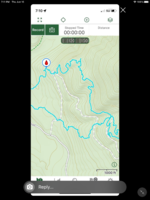
I have assumed it covered 3d distance within OnX because it will show an elevation profile for tracks. I've never cared to confirm.
 

Attachments

  • Screenshot_20220617-060002.png
    Screenshot_20220617-060002.png
    280.5 KB · Views: 19
Some are definitely lying/exaggerating and others are just absolutely clueless. Some will get 1/4 mile from the truck and actually think they "left the truck 1 1/2 miles ago".
100%! Using mapping apps helps tremendously. I know one elk of mine pre mapping days I thought was way back in the woods, like 3 miles. Once I actually checked it out with a gps it was only 1/2 a mile. Oops! Too be sorta fair to myself I walked more than half a mile to kill him, I just didn’t realize how much I had paralleled the road
 
TheTone- we hauled one bull up one time and I was convinced it was at least 2.5 miles from truck to bull. Upon further investigation, we found it was a pretty straight 1.1 miles! But... it was uphill the whole way and there was a ton of deadfall for the first half of it, so it seemed a lot farther than it actually was.
 
Within garmin connect you can bring up a map option once your info is loaded…..battery life on non solar unit I can only get 9 hrs running time so if want more the solar option may solve this….aerial images on garmin connect
Thanks, I found this option now in connect, very cool. I have the Solar version, and it doesn’t actually charge that fast tbh.
 
I've been using OnX for several years and it seems to be pretty good. If I compare known trail distance and elevation gain it seems to match up really well.

I have had some glitches saving the tracks, but they usually come back.

The other GPS units I have used were wildly inaccurate. But, they are also very very dated. I imagine the newer stuff is much better.

Sent from my SM-G986U using Tapatalk
 
Back
Top