BaseMap Pro Review 2021 - Offline Upgrades

realunlucky

Super Moderator
Staff member
Joined
Jan 20, 2013
Messages
14,138
Location
Eastern Utah
I used BaseMap last season and really enjoyed the multiple mapping layers for online scouting. I did struggle a bit fully converting over you can read that thread HERE. I'm the first to admit lacking even average technology know-how so I've really enjoyed learning about how everyone uses the features.

I've decided to continue to learn about and use BaseMap Pro for the 2021 season. I've been using it for a couple of months now and wanted to let everyone know they've upgraded the user interface (easier to use for dummies like me).

One thing Basemap really focused on was offline mapping. They increased the download speed and added map vaults -- basically saving offline maps to the cloud.

Here is a thread to discuss Basemap, ask questions of myself and other member users, and follow along as I stumble along through the 2021 season.

Here is my take on their latest upgrades.

BaseMap Pro Review 2021
 
Has anyone figured out how to create routes in BaseMap? I have a large property with a complex series of trails. I’d like to be able to walk, or ride ATV, and create the trail on the map.

Edit: never mind, just found the ‘Record Track’ feature. I’ll try it out.
 
Last edited:
Has anyone figured out how to create routes in BaseMap? I have a large property with a complex series of trails. I’d like to be able to walk, or ride ATV, and create the trail on the map.

Edit: never mind, just found the ‘Record Track’ feature. I’ll try it out.

Let us know if it works for you.


Sent from my iPhone using Tapatalk
 
  • Like
Reactions: prm
User interface definitely simplified but.. am i missing something or did they drop tons of different mapping layers? To me the biggest advantage of basemap vs other mobile apps were the multiple mapping layers. Now it just seems like there is 3, 1 satellite, 1 hybrid, and 1 topo.
 
User interface definitely simplified but.. am i missing something or did they drop tons of different mapping layers? To me the biggest advantage of basemap vs other mobile apps were the multiple mapping layers. Now it just seems like there is 3, 1 satellite, 1 hybrid, and 1 topo.

In our most recent update, we did eliminate some of the base maps. They were the maps that were least used by our users. This was done to simplify the toggle between sat, hybrid, and topo. We are looking at adding the maps back in at some point in a future update.
 
In our most recent update, we did eliminate some of the base maps. They were the maps that were least used by our users. This was done to simplify the toggle between sat, hybrid, and topo. We are looking at adding the maps back in at some point in a future update.

Personally, a few of those extra layers were the primary reason I used BaseMap. Removing those will substantially decrease my usage of the app, if not eliminate it. I always felt that the vast selection of maps was what set Basemap apart from the competition, so I hope to see them reinstated soon. Just some feedback from a user.
 
Personally, a few of those extra layers were the primary reason I used BaseMap. Removing those will substantially decrease my usage of the app, if not eliminate it. I always felt that the vast selection of maps was what set Basemap apart from the competition, so I hope to see them reinstated soon. Just some feedback from a user.
We appreciate your feedback and it has been sent back to our development team. Again, we made this decision based on historical use of the additional maps and to simplify the new toggle of the maps.
 
How to I get rid of that obnoxious black bar at the top advertising a hunt service. It eats up a huge part of my laptop screen.
 
Well it seems like every time I open the BaseMap app they have given it a slight tweak or upgrade. I really appreciate they are listening to thier users and stream lining the experience by enhancing user interface.

One of the newest features is XDR (Exact Direction and Range) it's a tool that will tell you the exact distance and direction to your destination.
99c934827edf5f0e165845c891eab964.jpg

To turn it on or off simply tap the compass. I've found it every handy for finding my tail cameras. Simply pull up the way point and click on it. Then click go-to
3aa0a16616bd6773dd5aaa7cdc064ae1.jpg
 
At the moment I'm not digging it. Primary use at this time is marking tracks and distances in the areas I will hunt this Fall. Between the black bar at the top they take over advertising a hunt service I will never use and the massive box that takes over the left side of the screen when I try to draw a line I'm left with less than half of the page in visible map. These folks should go look at what Google Earth has to offer in regard to visible map when calculating distance.

Really, it's driving me nuts.
 
At the moment I'm not digging it. Primary use at this time is marking tracks and distances in the areas I will hunt this Fall. Between the black bar at the top they take over advertising a hunt service I will never use and the massive box that takes over the left side of the screen when I try to draw a line I'm left with less than half of the page in visible map. These folks should go look at what Google Earth has to offer in regard to visible map when calculating distance.

Really, it's driving me nuts.
I think it'll be handy for planning stalks and navigating land mark to land mark.
Hopefully I get to try it on the opener this Saturday.
 
Well it seems like every time I open the BaseMap app they have given it a slight tweak or upgrade. I really appreciate they are listening to thier users and stream lining the experience by enhancing user interface.

One of the newest features is XDR (Exact Direction and Range) it's a tool that will tell you the exact distance and direction to your destination.
99c934827edf5f0e165845c891eab964.jpg

To turn it on or off simply tap the compass. I've found it every handy for finding my tail cameras. Simply pull up the way point and click on it. Then click go-to
3aa0a16616bd6773dd5aaa7cdc064ae1.jpg
good feature. thanks for the heads up.

And good luck on the opener Sam.
 
First time basemap pro user here. Is there a way to mass import waypoints or tracks? Can you migrate your OnX waypoints in batches vs just one at a time? Also was stoked to see USGS topo as an option when online, but it doesn't appear to downloadable for offline maps. Is that correct? No usgs topo?
 
First time basemap pro user here. Is there a way to mass import waypoints or tracks? Can you migrate your OnX waypoints in batches vs just one at a time? Also was stoked to see USGS topo as an option when online, but it doesn't appear to downloadable for offline maps. Is that correct? No usgs topo?

@BaseMap @realunlucky


Sent from my iPhone using Tapatalk
 
First time basemap pro user here. Is there a way to mass import waypoints or tracks? Can you migrate your OnX waypoints in batches vs just one at a time? Also was stoked to see USGS topo as an option when online, but it doesn't appear to downloadable for offline maps. Is that correct? No usgs topo?
Here's the BaseMap tutorial video on this very subject

Sent from my moto z3 using Tapatalk
 
In our most recent update, we did eliminate some of the base maps. They were the maps that were least used by our users. This was done to simplify the toggle between sat, hybrid, and topo. We are looking at adding the maps back in at some point in a future update.
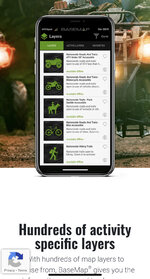
Were some of the layers removed too? The website claims hundreds of layers but I’m having difficulty finding them. I recently upgraded to the pro version and would love to explore some of the other activity specific layers too.
EC859B60-9441-42D4-8E50-6EC9485BD2CC.jpeg
 
Back
Top