Suppressor Private Party Sales

amedsker

FNG
Joined
Apr 1, 2026
Messages
10
Location
MO
Can someone please explain how private party suppressor sales work? I know the buyer has to fill out the ATF paperwork. I have a trust but have never purchased a suppressor from a private party and am interested in doing it.
 
I'll take a stab at it and keep in mind, I've only done 1...so anyone that reads something I don't have quite right, please correct me.

First off, the seller initiates the Form 4. It's easier to be together in one place to walk through and pass the computer controls back and forth. You could do it through a Teams/webex/etc type software too...but in person would be my preference. There is a lot of personal information (think all the stuff you had to give the NFA originally), that is associated with these Form 4's. I don't really want that information from the buyer to enter on the form 4 on his behalf.

The buyer needs a picture of himself, ETF file of fingerprints and trust paperwork all saved somewhere it can be accessed and uploaded/attached to the form 4.

The seller need the original stamp paperwork/email to make it easier. You search using numbers on the approval data to "look up" the suppressor and associate it to the transaction/form 4 you're filing out.

Then it's a matter of initiating the Form 4 through eforms and passing the computer controls back and forth to enter or attach the information.

Once certified, both of you will be notified via email. I hope this helps a little bit, we weren't as prepared as we should've been when I did it and this information would've been helpful to know/understand.
 
Thanks for the information. I’ve been looking into it but it’s a lot easier to understand the process when it’s coming from someone who has actually done it.
 
@Judd nailed it in the above post. I'll try to give a step by step guide with pics for a little more detail.

With the new eForms changes its very easy if you're in the same state. If its out of state the same process works, just has to go to an FFL/SOT in the seller's state first.

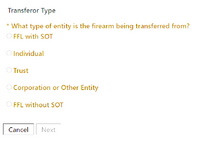
The SELLER needs to login to the eForms account then start a new Form 4. You'll see this screen. This is who the suppressor is being sold by/coming from. Select whichever one is appropriate.

1783873689663.png

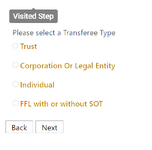
The next couple pages will be the seller filling out their info. Then you get to the screen for the transferee (buyer). If you're buying it on your trust, you'll need some additional info and forms vs as an individual.
1783873950139.png

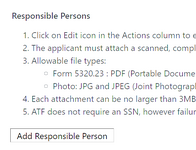
If trust, click trust and fill out the name and address for the trust. Next will be where you add responsible persons.
1783874027483.png

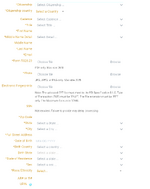
Click add responsible person. You'll have to do one for each RP on the trust.
1783874067128.png

Fill out all the info. It will make life easy if you have electronic prints. You will also need a 5320.23 for each responsible person. I recommend National Gun Trusts and their 5320.23 generator. These MUST be signed in wet ink then scanned to be uploaded. You cannot sign electronically.

Next will be your CLEO information.

Then you have to add a firearm. eForms now has "inventory" so it knows what NFA items you have. This is why the seller has to do this, the item they are selling is in their inventory and they will choose it from there. There are multiple ways for them to search for it.
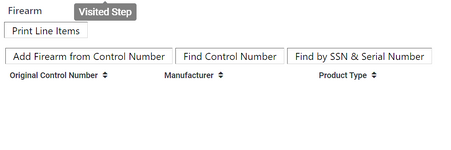
1783874285460.png


Next is electronic documentation. This is where you will upload your trust info.
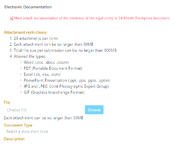
1783874333294.png


Then you verify all of the info and certify and done. Then you just sit back and wait for it to be approved. Fairly simple process, just make sure you have all of the info, forms, trust, and pictures ready to go before starting.

 
Back
Top